

- -20%


MIP in Single Configuration Ethernet for the Boeing 737 MAX Simulator
MIP in Single Configuration Ethernet for the Boeing 737 MAX Simulator
SISMO · FLIGHT SIMULATOR HARDWARE
Ref. S7MX-MIP-F-YL-A10-0260Fully assembled single-configuration main instrument panel for Boeing 737 MAX simulator cockpits, with integrated TFT displays, backlit modules and Ethernet connectivity.
 Full-scale (1:1) single configuration.Metal structure and casings in Boeing 787 grey and RAL 7011 grey.Matte-black aluminium glareshield.2 fully mounted 15-inch TFT main displays with VGA interfaces.Injection-moulded replica knobs.Warm-white backlighting and operational modules and gauges, except items identified as dummy.Fully assembled and ready for connection.Compatible with the FBC cockpit.CDU bay designed to accommodate common CDU models, including Fly Engravity and CPFlight.Shipped in a custom-made wooden crate.Ethernet communication through the SimCard SC-MB Ethernet.Electronic baseplates connect the modules and control electronics.Main TFT displays ready to connect to your computer.3 m Ethernet cable and 12 V / 5 A power supply included.Included backlighting dimmers can also control MCP and EFIS backlighting.Supported simulators: Microsoft Flight Simulator 2020 and 2024.Compatible add-ons: ProSim and iFly 737 MAX.iFly 737MAX: MSFS 2020/2024 through SismoLink V2.1 or later.

Equipment dimensions. Select the drawing to view it at full size.
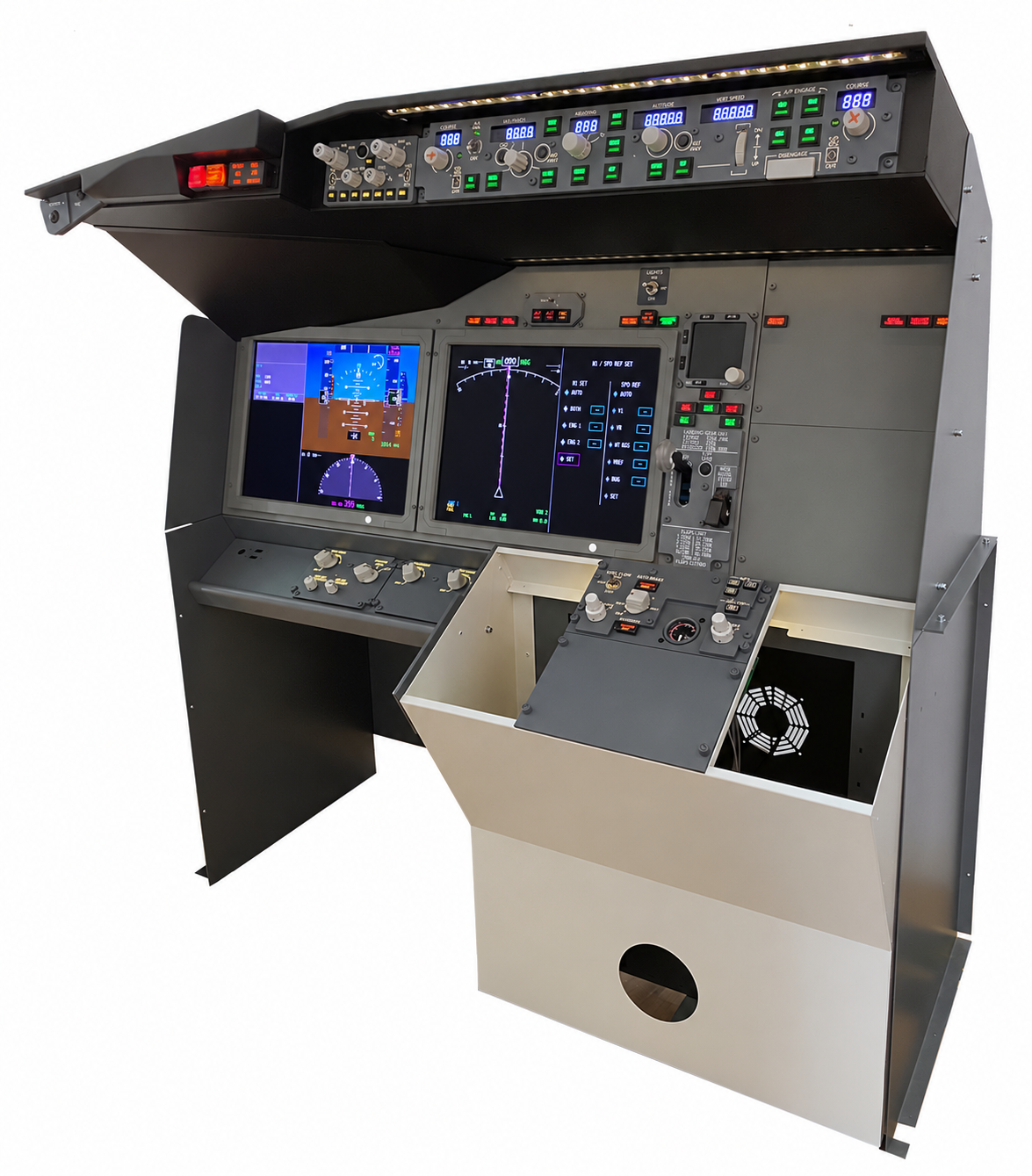
Equipment depends on the selected options. Select the image to view it at full size.
ISFD: dummy panel or USB instrument.EDC configuration and included modules are listed below.1 × MIP in Single Configuration Casing.1 × Captain Glarewing with MIC/CLOCK module (this module is dummy).2 × DU TFT Monitors 15" with VGA interface.1 × Flight Deck Lighting under Glareshield.1 × MCP/EFIS Lighting under Glareshield.2 × Backlight Dimmer for MIP Backpanel.2 × Metal Display Bezel.2 × Display Smoke Glass.8 × Metal DZUS (fastener) with screw.1 × Captain Instrument Panel Annunciators Kit.1 × F/O Instrument Panel Annunciators Kit.1 × Landing Gear Lever + Panel + Backlight.1 × MIP Light Test Module.1 × Stab Out of TRIM Annunciator.1 × HBP Gauge with backlight.1 × Integrated Standby Flight Display (ISFD) — dummy panel or USB instrument, as selected.1 × Standby Blind Plate.1 × Autopilot Flight Director System Module (AFDS) — Alpha Line.1 × Background and AFDS Flood Light Control Module (BALC) — Alpha Line.1 × Captain Display Brightness Control and Selector Panel Module (CDBCDS) — Alpha Line.1 × Captain SixPack Module + Master Pushbuttons — Alpha Line.1 × Engine Display Control Module (EDCP) — Bravo Line.1 × CAIP Electronic Baseplate — Alpha Line.1 × FOIP Electronic Baseplate — Alpha Line.1 × Ethernet Cable 3 m.1 × Power Supply 12 V / 5 A.
Metal casing with a durable painted finish, compatible with the FBC cockpit.

Matte-black aluminium glareshield.

Modules and gauges are mounted, wired and backlit. Items identified as dummy remain non-functional.

Designed to accommodate common CDU models, including Fly Engravity and CPFlight.

2 main displays fully mounted and ready to connect to your computer.

Engine display control module; configuration depends on the selected options and parts list.

SimCard SC-MB Ethernet provides communication with the simulator software.

Backlighting dimmers are included and can also control MCP and EFIS backlighting.

Data sheet
No customer reviews for the moment.